
This is an old revision of the document!
Table of Contents
Oorsprongspunten instellen en bewaren
Inleiding
Stap 1: De drie assen
Het begrip “oorsprongspunt” of “nulpunt” refereert naar een positie van de X- en de Y-as van de machine. De “namen” of de karakters die de asrichtingen of de “assen” aanduiden, komen uit het Carthesiaans coördinatensysteem en worden als volgt gedefinieerd:
- de X as is de as van links naar rechts waarover het spindelwagentje beweegt. Als het machine portaal stilstaat en de spindel wagen beweegt van links naar rechts en vice versa, beweegt hij in de X-as richting. Wanneer de spindelwagen naar rechts beweegt is dat een positieve X-beweging (de X coördinaat verhoogt). Wanneer het spindelwagentje naar links beweegt is dat een negatieve X-beweging (de X coördinaat verlaagt).
- de Y as is de as van voor naar achter waarover het portaaltje beweegt. Wanneer het spindelwagentje stilstaat en het portaal beweegt van voor naar achter en omgekeerd, dan beweegt dat portaal in de Y-as richting. Wanneer het portaal naar achteren beweegt is dat een positieve Y-beweging (de Y coördinaat verhoogt). Wanneer het portaal naar voren beweegt is dat een negatieve Y-beweging (de Y coördinaat verlaagt).
- de Z as is de vertikale as waarover de spindel omhoog en omlaag beweegt. Wanneer de spindel omlaag beweegt is dat een positieve Z-as beweging (de Z coördinaat verhoogt). Wanneer de spindel omhoog beweegt is dat een negatieve Z-as beweging (de Z coördinaat verlaagt).
Stap 2: De oorsprongspunten of "nulpunten"
De oorsprongspunten worden soms ook “nulpunten” genoemd. Het begrip “nulpunt” zegt perfect waar het voor staat: Het is de precieze plaats waar de X-as coördinaat en de Y-as coördinaat gelijk zijn aan nul. Gelijk welke plaats boven de graveertafel kan als nulpunt gedefinieerd worden. Op die plaats worden de coördinaten X=0.0 en Y=0.0.
Er zijn drie soorten “nulpunten”: het machine nulpunt, het programmeerbare nulpunt en het tijdelijke nulpunt.
- Het Machine nulpunt is een vast punt in de X, Y en Z richtingen. Voorbij dat punt kan het spindeltje niet bewegen. Dat punt wordt bepaald door de machine constructie. Telkens de machine wordt aangezet moet het machinenulpunt opgezocht worden. Het machinenulpunt bevindt zich links achteraan het graveertafeltje met de spindel omhoog. Bovenaan het virtuele toetsenbordje worden alle coördinaten (X, Y en Z) afgebeeld met 0.00 mm.
- Programmeerbare nulpunten. Gelijk welk punt boven de graveertafel kan permanent bewaard worden als nulpunt. Om het onderscheid te maken met het machinenulpunt noemen we dit een “programmeerbaar nulpunt”. Niet alleen kan eender welk punt boven de graveertafel als nulpunt ingesteld worden, het kan ook bewaard worden voor later gebruik, bv. als dezelfde job nogmaals uitgevoerd moet worden, of bij gebruik van de zelfcentrerende spanvijs. Er kunnen maximaal 9 verschillende oorsprongspunten in het geheugen bewaard worden.
- Het tijdelijke nulpunt is een nulpunt dat eender waar boven de graveertafel gedefinieerd kan worden, maar dat niet permanent in het geheugen bewaard wordt. het wordt tijdelijk gebruikt tot er een ander nulpunt gedefinieerd of opgeroepen wordt, of tot dat de machine uitgeschakeld wordt.
Stap 3: Specifieke nulpunten gebruiken
When a machine leaves the factory, it only contains the machine home. For conventional engraving jobs with rectangular plates or tags, this is the most suitable home position. The machine home is in the upper left corner of the engraving table. Why then provide the possibility of programming a home?
There can be several reasons. A few examples will illustrate this:
- Imagine someone wants to engrave small objects, like pushbuttons, which are difficult to hold on a flat table, so they cannot be put on the machine table. In that case they will want to use a clamping system like a vise, of which the position in the machine can be quite random. In that case, you will want to place the home position on the upper left corner (or in the centre) of the surface you are to engrave.
- Or in the trophy industry, circular or randomly shaped medals will be placed in a so-called vise anywhere on the machine surface. As the name “center vise” already hints, the origin point will be placed in the center of the object, and the coordinates system will work in a slightly different way. We will get back to this later on.
Setting, saving and canceling a home position
Setting a home position
- Using the arrow-keys


 the spindle carriage can be moved anywhere over the engraving table.
Or, using the XYZ key , the spindle can be moved to any precise location over the engraving table.
 - Pushing the “set Home”
 key makes this spot the “temporary” soft home, and the coordinates of X and Y of this spot become 0,00.
This point will remain valid as long as no other home is entered, or until the machine is rebooted. Any job executed from then on will use this point as origin point.


Canceling the temporary home position
It is always possible to cancel the temporary soft home by using the Shift  and then the Go home
  key. This will initialize the machine-home.
Saving one or more permanent home positions
If a specific spot has to be saved into the machine memory as an origin point, here is how to achieve this.
- First jog the spindle to the desired spot over the engraving table, or use thekey to move the spindle there.
- Then push the “Shift” button
 and verify that the shift arrow in the status bar of the virtual pendant gets a different colour
  .
. - Push the
 button. The following dialog window opens: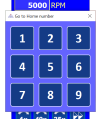
- Pick a number you want to use and click on it (from 1 to 9).


Doing so the spot where the spindle stands will become the active home position (0,0), and the number under which this position was saved, will be displayed in the upper right corner of the Cyborg virtual pendent. If home 3 was chosen to save this set of X,Y coordinates, this is what you will see:  .
.
Activating a preprogrammed origin point
To reactivate call a previously recorded programmable home position, click the  key. The “Go to home number” window appears. When you click on one of the nine available keys, the spindle will move to that specific home position and the virtual pendent will display the number of the active home position in the upper right corner of the Cyborg virtual pendent.
When one of the preprogrammed origins is recalled, this origin also becomes the new soft home, and replaces the possibly existing soft home. After switching off the machine and rebooting it, the machine home becomes the origin point again, but the preprogrammed origins (1-9) remain in the machine’s memory and can be reactivated any time.
Recalling the last softhome after machine reboot
If you have used a soft home, then switched off the machine, or if you had a power fail, and you reboot the machine, it is still possible to recall the last used soft home from before the reboot. This can only be done if after the reboot no new soft home was determined. To recall the last used soft home, click and then  .
.
Continue to choosing Z modes.
Continue to the table of contents.


